
5 Warning Signs Your PlayStation Is Overheating (And How to Fix It in Qatar)
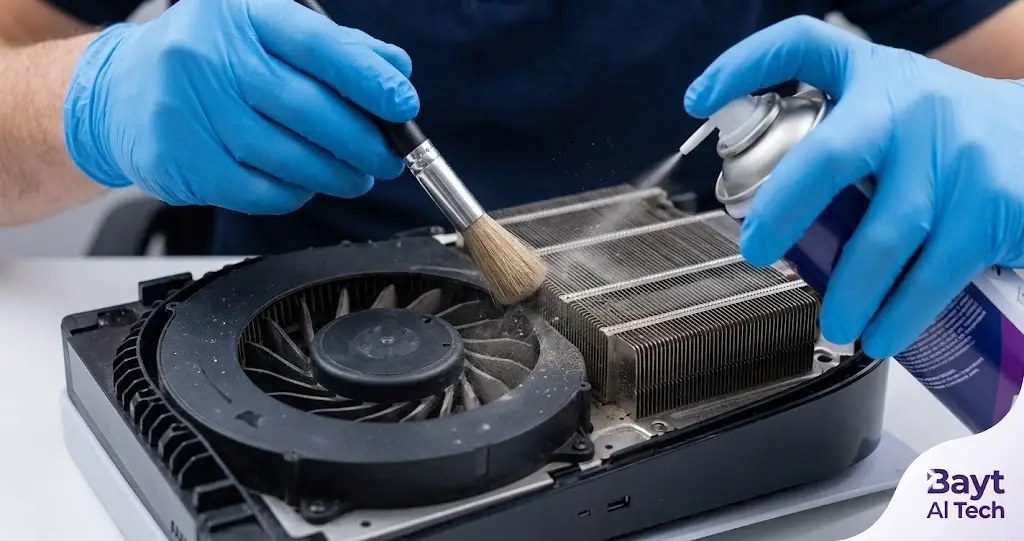
Is your PS5 or PS4 making a noise like a jet engine taking off? Have you seen the dreaded warning message on your screen stating, “Your PS5 is too hot. Turn off your PS5 and wait until the temperature goes down”?
Overheating is one of the most frequent issues console gamers face, especially in Qatar’s warm climate. Dust buildup, degraded thermal liquid metal, and poor airflow can quickly cause your console’s cooling system to fail. Left unresolved, extreme heat can lead to permanent hardware failure, motherboard damage, or sudden shutdown loops mid-game.
In this guide, we cover the main warning signs, quick prevention tips, and how professional console service at Bayt Al Tech can safely restore your PlayStation.
Common Symptoms of an Overheating PS4 or PS5
If your console exhibits any of these symptoms, its internal cooling system needs attention:
Loud, Constant Fan Noise: The cooling fan runs continuously at maximum speed attempting to push out trapped heat.
On-Screen Temperature Warnings: The system displays automated heat warning prompts to prevent hardware burnout.
Random Shutdowns During Gameplay: The console automatically powers off during demanding titles to shield the APU from thermal failure.
Frame Rate Drops & Stuttering: Games slow down or stutter as the processor thermally throttles to lower its temperature.
Console Exterior Feels Hot to the Touch: While moderate warmth is normal, extreme exterior heat coupled with faint ventilation output indicates restricted airflow.
What Causes PlayStation Overheating?
Dust & Lint Accumulation: Dust particles clog the heat sinks, cooling fins, and fan blades, locking heat inside the chassis.
Degraded Thermal Compound / Liquid Metal: Over time, the thermal transfer material between the processor and heat sink can degrade or shift, causing poor heat dissipation.
Restricted Ventilation: Placing the console in enclosed cabinets, tight TV stands, or too close to walls blocks fresh air intake.
Fan or Power Supply Faults: Aging internal components or power supply unit (PSU) issues can reduce cooling efficiency.
Quick DIY Tips to Keep Your Console Cool
Before booking a service, try these quick maintenance steps:
Reposition Your Console: Keep at least 4 to 6 inches of open space around all sides of your PS4 or PS5. Avoid carpeted surfaces and closed entertainment units.
Clear Outer Vents: Carefully wipe down exterior air intakes using a microfiber cloth or soft brush.
Maintain Room Climate: Play in air-conditioned rooms to prevent ambient room temperatures from straining internal cooling fans.
Important Note: Avoid disassembling your PS5 at home. The PS5 uses conductive liquid metal for thermal dissipation, which can easily leak onto the motherboard and cause irreversible electrical shorts if handled without specialized technical equipment.
Professional PlayStation Repair & Cleaning at Bayt Al Tech
When basic surface cleaning isn’t enough, Bayt Al Tech offers specialized gaming console repair and deep cleaning services across Doha, Qatar.
Our certified technicians handle complete internal console servicing:
Deep Internal De-Dusting: We open the console chassis to safely remove dust from deep within the heat sink channels, power supply vents, and fan blades.
Liquid Metal & Thermal Paste Application: Expert replacement and re-leveling of thermal compounds to optimize heat transfer away from your processor.
Fan & PSU Replacements: Diagnostic testing and replacement of failing cooling fans or overheating power supply units using quality parts.
Convenient Pickup & Delivery: Enjoy quick doorstep pickup and delivery options anywhere in Qatar.
Is Your PlayStation Running Hot?
Don’t let thermal issues damage your console or disrupt your gaming. Bring your PS4, PS5, or PS5 Pro to Bayt Al Tech for fast diagnostics and expert repair.


